Every confirmed patient tell, grouped by where it shows up — at the window, in the photo, on CCTV or on the paperwork. Search by name or symptom, or filter by detection channel. Roaming monsters are listed separately below.
 At the window
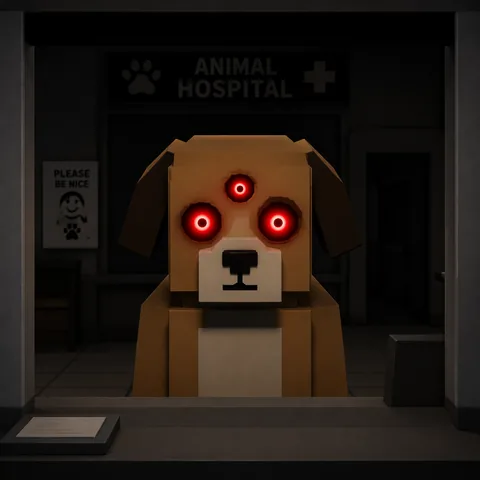
Three Eyes
Three glowing red eyes instead of the usual two.
The extra eye is often slightly mismatched in size or height, and the patient's real eyes are sometimes still visible behind the glow. Almost always paired with a low, distorted voice.
▶ Reject on sight — always an anomaly, no further checks needed.
 At the window
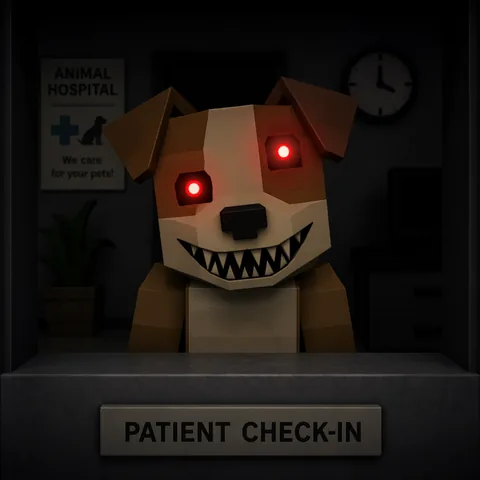
Mismatched Eyes & Sharp Teeth
Two uneven glowing eyes over a crooked, sharp-toothed grin.
The eyes sit at clearly different heights and the mouth is a menacing, distorted smile full of sharp teeth. A low-pitched voice confirms it.
▶ Reject — close the shutter.
 At the window
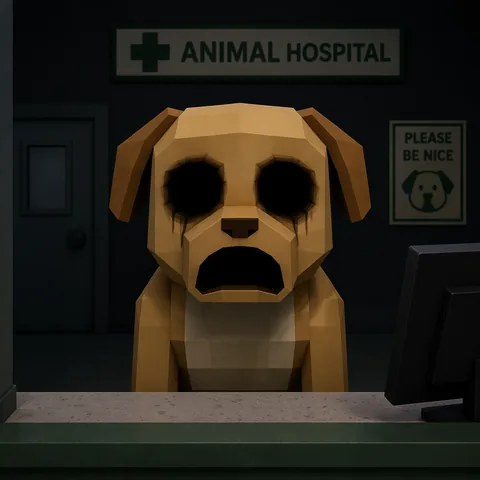
Hollow Face
Dark empty eye-sockets and a wide, frowning mouth.
Two black holes where the eyes should be, usually twitching. Linked to the Head Banger; during its recovery stage it guarantees a Death Ritual, so it is never safe to admit.
▶ Reject — do not let it inside.
 At the window
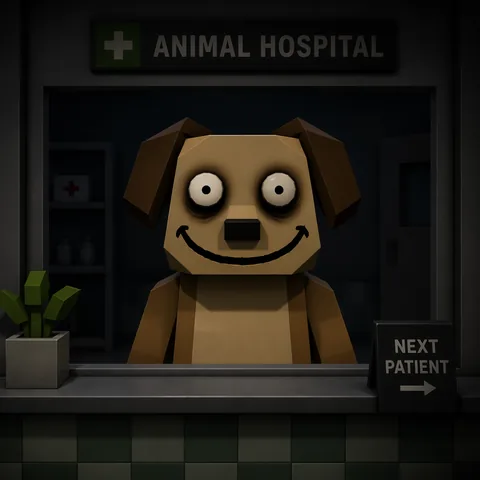
Wide Eyes & Drawn-on Smile
Big black-pupil eyes, heavy eye-bags and a large drawn-on smile.
One of two 'unnatural face' variants. It loses its real face and keeps staring at you as you move. A distorted voice confirms it.
▶ Reject immediately — no camera check required.
 At the window
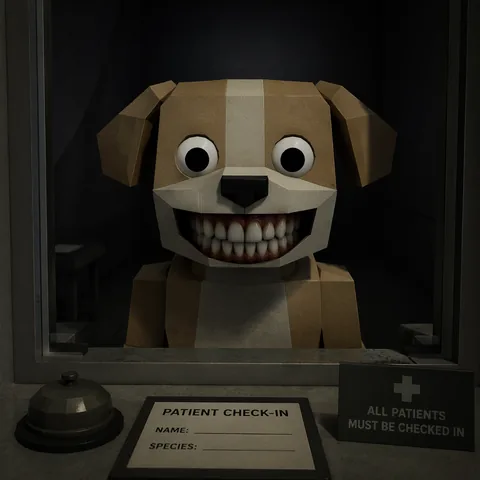
Human Teeth
Small wide eyes with a set of realistic human teeth.
The second 'unnatural face' variant — an unsettlingly human mouth on an animal. Stares at you and speaks in a low, distorted voice.
▶ Reject — don't bother checking it in.
 At the window
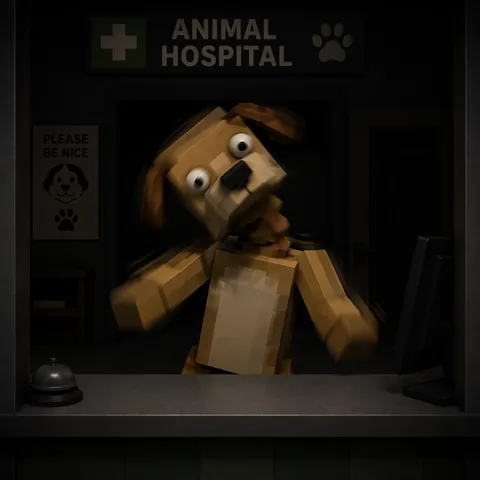
Twitching
Arms, head or neck jerk in sudden, sporadic movements.
A genuine patient stands still. Watch for a full four to five seconds — the twitches can be very quick, and sometimes only show on CCTV.
▶ Reject — cross-check the camera if you're unsure.
 At the window
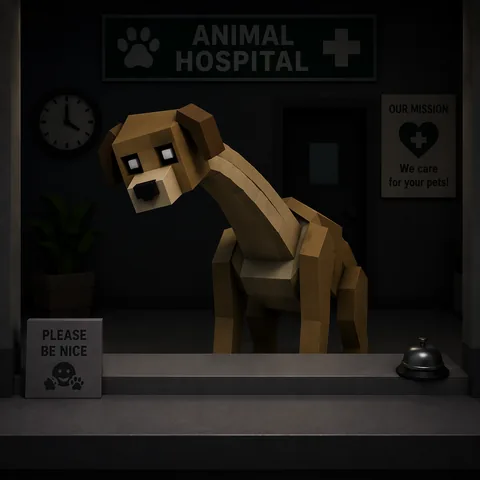
Hunched Posture
Stands hunched, sometimes with an elongated neck.
Almost never seen on a real patient and usually paired with twitching. It can also look different again through the camera.
▶ Reject — usually travels with another tell.
AudioDistorted Voice
A deep, low-pitched, distorted voice at the window.
Bundled with most appearance anomalies — three eyes, mismatched eyes, the unnatural faces. If the voice is wrong, the patient is wrong.
▶ Reject — a near-guaranteed audio tell.
 Photo
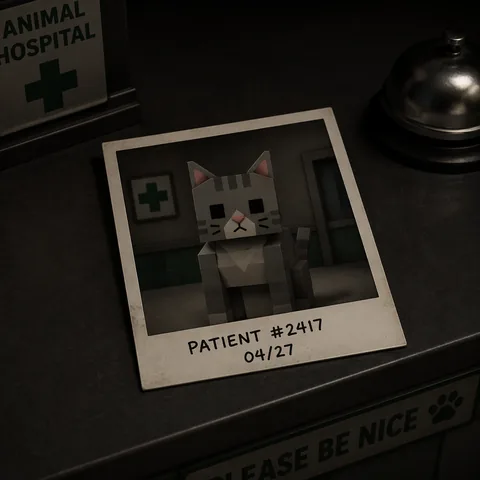
PhotoIncorrect Photo
The developed photo shows a different model than the live animal.
A different colour, different markings, different horns or even a completely different animal. Compare the photo against the patient in front of you.
▶ Reject — trust the mismatch.
 Photo
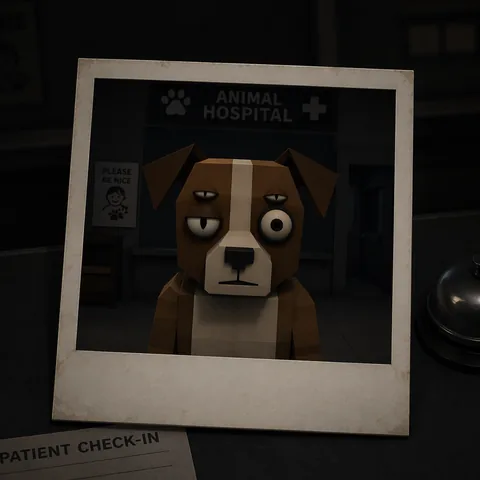
PhotoDifferent Eyes (Photo)
The photo's eyes differ from the live animal's.
The change can be subtle — an extra eyelid, or a pupil present in one and not the other. Look closely before you decide.
▶ Reject — small eye differences still count.
 Photo
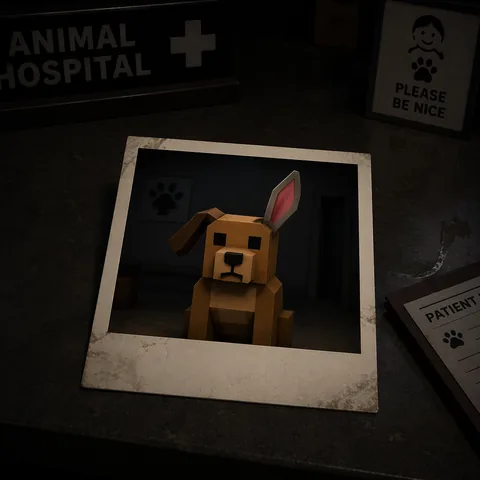
PhotoDifferent Ears (Photo)
The photo's ears differ from the live animal's.
Usually more obvious than the eye differences — a different shape, size or set of ears — but still worth a careful side-by-side look.
▶ Reject.
 Photo
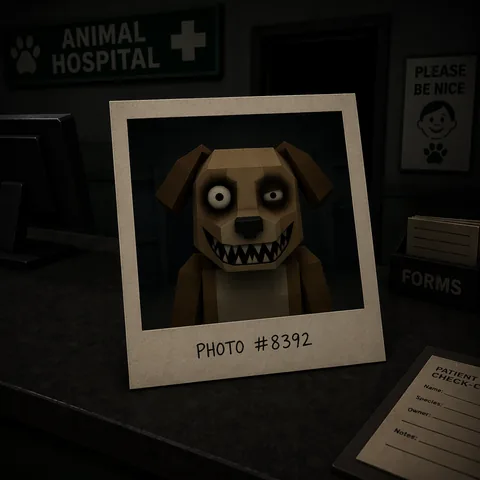
PhotoUnnatural Photo
A normal-looking patient whose photo shows a grotesque face.
The live animal looks fine, but the developed photo reveals a toothy grin, uneven eyes, a human mouth or a heavily blurred face. This is why you photograph every patient, even the calm ones.
▶ Reject the moment the photo turns.
 Photo
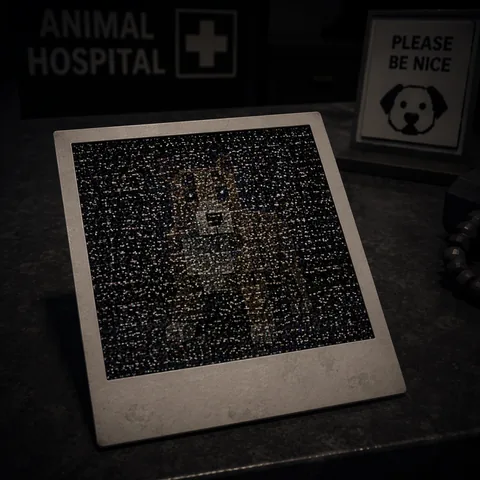
PhotoStatic Photo
Grainy static obscures the developed photo.
As of 6/22/26 static alone no longer guarantees an anomaly — with no other tell the patient may be real (shooting them just makes them faint). Treat it as a prompt to look harder, not a verdict.
▶ Confirm with a second sign; when unsure, reject (over-rejecting is safe).
 Photo
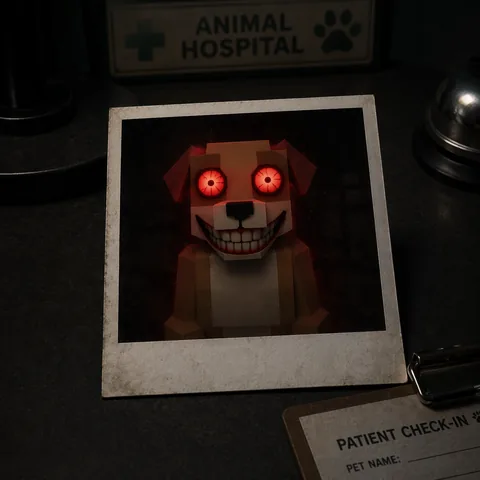
PhotoCursed Photo
Bloodshot eyes and a grotesque grin in the photo.
Reading a cursed photo costs 10 Sanity, so let it develop on the desk and judge it there first. If it looks wrong lying down, close the shutter without ever picking it up.
▶ Reject — never pick up a cursed photo mid-process.
 Photo
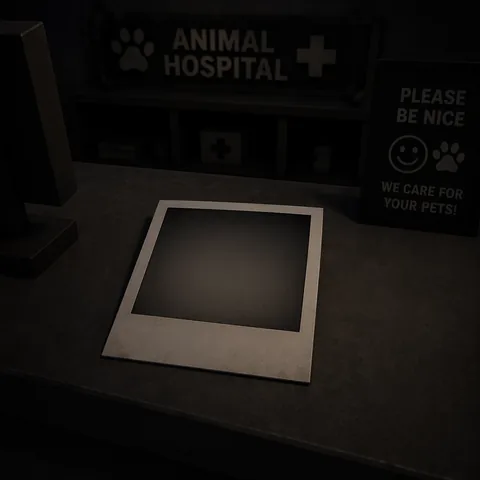
PhotoUnprocessed Photo
The photo never develops, while the next patient's does.
A dead, unrenderable photo is itself the tell — confirmed when the following patient's photo resolves normally.
▶ Reject — treat the blank photo as a fail.
 CCTV
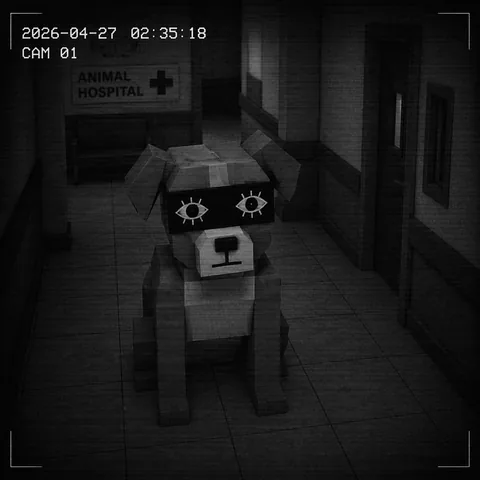
CCTVCensored / Black-box Eyes
A black rectangle over the face with fake eyes drawn on top.
Only shows on CCTV; the patient looks normal in person and in the photo. An obvious camera tell once you switch feeds.
▶ Reject.
 CCTV
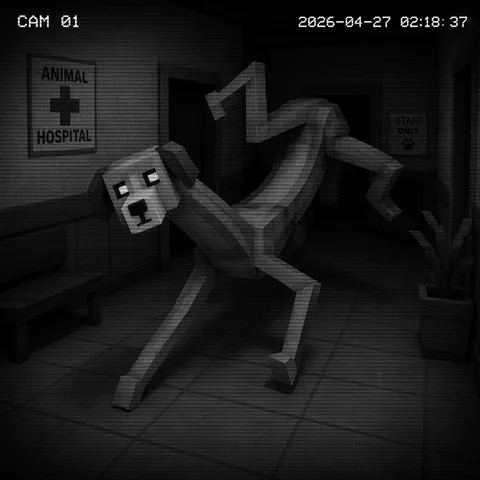
CCTVUnnatural / Stretched Body
Elongated, distorted body on camera.
Limbs poke out at strange angles and the shape can change every time you close and reopen the feed. Holding the photo while on CCTV makes it look stretched too.
▶ Reject — reopen the feed to confirm.
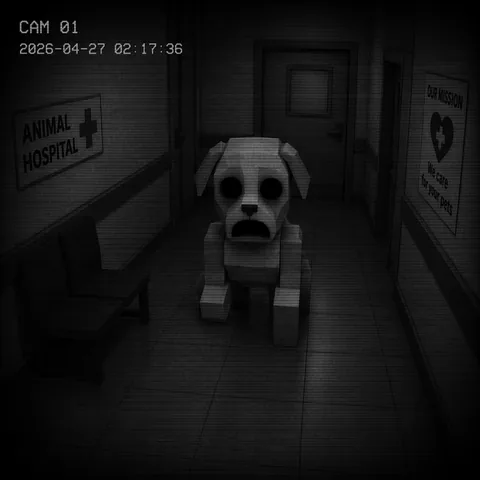 CCTV
CCTVHollow Face (CCTV)
Empty eye-sockets visible only on the camera.
The same hollow face can appear on CCTV alone, and it's easy to miss if the patient isn't facing the lens. Use the waiting-room camera for a clear look at the eyes.
▶ Reject.
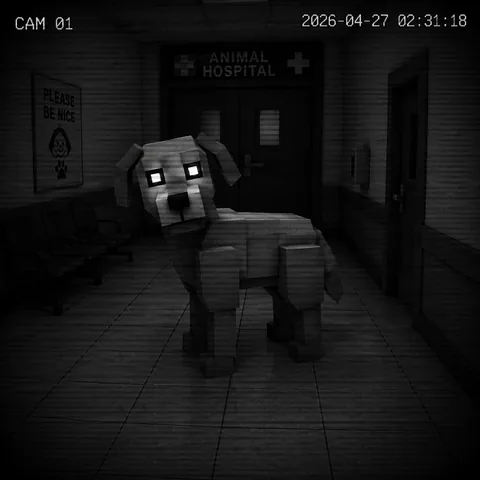 CCTV
CCTVStaring at the Camera
Looks dead into the CCTV at all times.
A genuine patient stares ahead toward the office, never at the camera — even while walking. Direct eye contact with the lens is the tell.
▶ Reject.
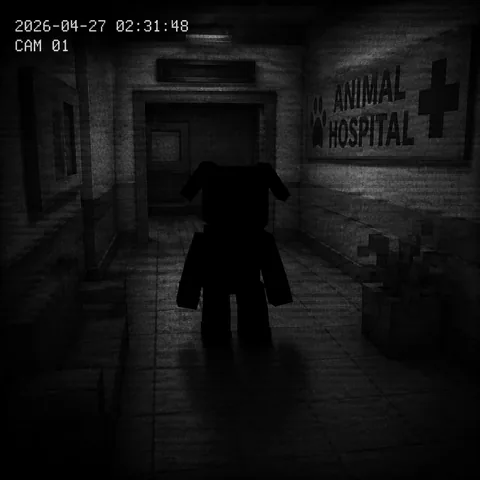 CCTV
CCTVVoid / Black Body
The whole body is solid black on camera.
Every feature is erased, which makes it one of the easier camera tells. A rarer 'disfigured void' variant is partly malformed and even easier to catch.
▶ Reject.
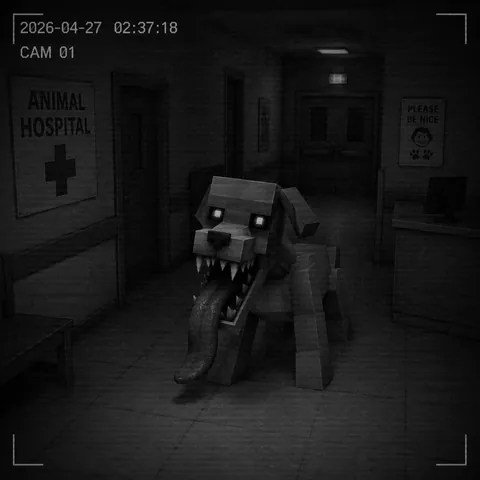 CCTV
CCTVSkinwalker on CCTV
Shows as a sharp-toothed, long-tongued Skinwalker only on camera.
Wide jaws, sharp teeth and a lolling tongue that appear on CCTV but not in person or in the photo, and only once it reaches the check-in spot. Use the lobby/waiting-room camera for a side view.
▶ Reject — never admit a camera Skinwalker.
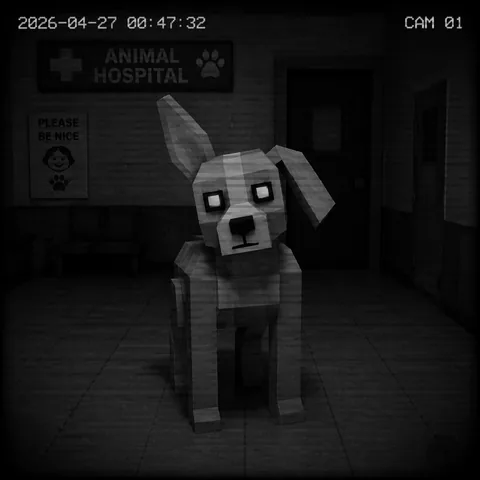 CCTV
CCTVMismatched Ears/Eyes (CCTV)
Ears or eyes differ on camera versus at the window.
The hardest tell to read — the cameras sit far from visitors and only the waiting-room feed shows the eyes. Note the ear and eye shape in person first, then compare on camera.
▶ Reject — check the waiting-room camera specifically.
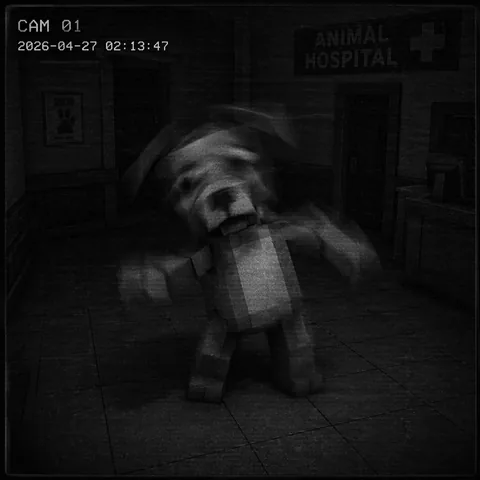 CCTV
CCTVTwitching (CCTV)
Twitches only on the security camera.
Looks perfectly still in person and in the photo but jerks on CCTV. Watch the feed for a full four to five seconds or you'll miss it.
▶ Reject.
PaperworkMissing Appointment
Looks perfectly normal but isn't on the appointment list.
Some anomalies pass every visual check. The clipboard is your backstop — if there's no booking for this patient, they shouldn't be admitted.
▶ Reject — always check the appointment list.
PaperworkWrong Paperwork Details
Clipboard details don't match the animal in front of you.
Species, name or appointment details that contradict the live patient are a tell in their own right — cross-read the clipboard before you open the shutter.
▶ Reject.
No anomalies match that search.